Archive
The Origin Of Forehand And Backhand Tennis Technique
The Origin Of Forehand And Backhand Tennis Technique
You can develop tennis technique in a very simple and natural way. Have you ever asked yourself: Why do all these 3 forehands look very similar?
 |
Were these players taught the technique in the same way or is there some hidden reason why they all hit the forehand in almost the same way?
Just to clarify, by tennis technique I refer to certain position and movement of legs and arms which are supposed to be correct – for example:
- when you are prepared for the shot on groundstrokes, the butt of the racquet is pointed towards the ball
- at the point of contact the racquet is parallel to the ground and the arm is bent in the elbow
- the follow through for forehand is above your shoulder
- closed stance means that legs are one after another, open stance means they are parallel
- for one handed backhand the body needs to remain sideways when you are hitting the ball
- …
All these and many more are technical instructions that coaches give to players in order to improve their shots.
But why has to be technique more or less like this?
Is there a simpler way, a more natural and much quicker way of learning tennis than memorizing tens of little instruction tips?
Yes, there is and for that we need to understand why is technique like that.
There are 3 main factors that define the tennis technique.
For the sake of simplicity and easier understanding lets focus first on forehand and backhand and later apply these principles to volleys and serve.
The first factor is the law of physics which includes geometry, gravity, air resistance and other.
Your goal in tennis is to make the ball fly above the net and then land inside the court.
Developing Tennis Technique Step 1: Angles
In order for a player to control the ball flight they need to control direction (left – right) and depth / distance which is closely related to height of the shot.
This means that the player controls the ball with the angle of the racquet with which he directs the ball left or right and up or down. He also controls the ball with the force / speed with which he hits the ball and with the angle of the path of the racquet.
The racquet face may move towards the ball in a straight line or with an angle – for example the racquet may be moving upwards when contacting the ball.
So in a very simple way of saying, we have a flat surface with which we direct the ball towards the target. We can control the left – right angle and the top – bottom angle and how much force / speed we use to hit the ball.
Developing Tennis Technique Step 2: Swing
We can also move the racquet at a certain angle towards the ball. Of course as you can see from the video, holding the racquet in this way does not give us enough power so need a way of accelerating the racquet more.
That’s the second factor and it’s the biomechanics of our body. We need to hold the racquet in the hand and swing on the side of the body. That way we can produce a lot of speed and transfer the energy from the racquet.
Developing Tennis Technique Step 3: Drive Through The Ball
The third factor that determines tennis technique is the limited ability of the human mind and body.
If we swing towards the ball with a racquet in our hand, we will move the racquet in a circular way since the arm acts as a lever attached to the body.
If we had a perfect computer in our mind and perfect judgment of speed and distance of the ball, then this technique would work great. It would give us the maximum speed of the racquet face.
But we don’t.
To give you some idea about the difficulty of hitting the ball at the right angle to direct it towards our desired target, here are some numbers:
If you change the angle of the racquet by 1 degree (left – right), you will change the landing spot on the distance of the tennis court by 40 centimeters.
If you rally with a friend at a slow speed, the ball may be coming towards you with the speed of 40 km per hour. A typical swing speed towards the ball with your racquet is about the same.
For the sake of easier calculations let’s say that the combined speed of the ball coming to you and your racquet going towards the ball is 72 km / hour or 20 meters per second.
That means that the ball travels 1 meter in 0.05 seconds. If your arm and racquet together are 150 cm long, then when you move your racquet forward for one inch (2,5 cm), you will change the racquet angle for 1 degree.
The ball travels one inch – 2,5 centimeters in 0,00125 seconds.
So if you don’t wan’t to miss more than 80 centimeters (40cm left or 40 cm right), you must hit the ball within 3 thousands of a second of the perfect timing!
 |
Picture: Note how different points of contact determine where the racquet face is pointing if we just swing the racquet around our body.
This makes you wonder how we are actually able to play tennis.
Since this is impossible for a human brain and body to calculate every time perfectly, we can compensate with our body and especially the arm since it is not straight like a stick, but it can bend.
What we want to achieve is to move the racquet face pointing towards the target in a straight line, so that even if we mistime the ball for a few thousands of a second, it will still go in the right direction.
With this we effectively compensate for our imperfect ability to judge the ball speed, distance and swing at the right time.
So the racquet needs to move like this:
SIDEBAR
Another benefit of this movement is that we feel we have more control of the ball. The ball actually starts going where we imagined it to go.
A very good trick to understand the effect of a long “push” through the ball in to actually have someone push you for a short time and for a longer time and your goal is to know exactly in which direction they pushed you.
The ball “understands” the racquet in a very similar way. If it is contacted and “pushed” towards a target only for a short time, it doesn’t get enough information to know where exactly needs to go.
So it will fly “somewhere” there.
If the ball is contacted for a longer time, it will know much better where to go. 😉
SIDEBAR
Developing Tennis Technique Step 4: Top Spin
The last component of correct tennis technique is spin and that’s again the first factor – the law of physics.
Spin enables you to hit the ball fast and it will still land inside the court because of the air pressure which is higher above the ball than under the ball.
For more detailed explanation of this phenomenon check this article.
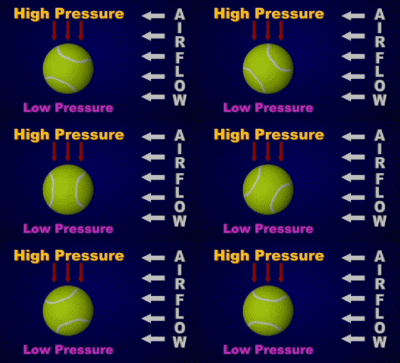 |
| Picture from NASA Moon tennis |
In order to spin the ball the racquet needs to brush the ball going from under and upwards.
That way the ball will spin forward and this will make it curve down sooner.
You need to combine the previous motion of moving the racquet forward in a straight line with moving the racquet upwards and creating spin.
See if you can notice this element of tennis technique in these pictures of Tommy Haas’ forehand. Notice the racquet keeping the same angle and moving upwards.
 |
| Pictures from Hi-techtennis.com |
Developing Tennis Technique Step 5: Putting It All Together
And what is the last step? The last step is finding the most energy efficient, economical, comfortable way of doing this.
This includes the grip, body position, footwork and transferring your movement into the ball in a controlled way.
A good way to find these elements of tennis technique is to go to extremes.
Let’s first find the best grip; watch the two videos to see how I experiment with both extremes and how uncomfortable and non-economical that is.
So what grip is the most comfortable and gives me the most control and power so that I can drive my racquet forward in a straight line and at the same time move it upwards with good acceleration?
That’s eastern forehand grip or semi-western for a little more natural spin on the forehand side and eastern backhand grip on the backhand side.
But the names of the grips are totally irrelevant unless you want to compete in a quiz. 😉
How about the footwork? Surely you’ve heard about the closed and open stance and the stances in between.
Again, go to extremes and find the position of your feet that give you the most power, comfort and control.
In case of forehand you’ll notice that open stance feels the strongest while closed stance enables to drive the racquet forward in straight line longer and thus gives you more precision.
Backhand usually feels best only in closed stance but open stance is often needed in extreme situations.
That’s how you learn the footwork – by feeling it. And now what you need to do is get into this position before you hit the ball.
Now just hit hundreds of balls trying to achieve:
- keep the racquet face pointing towards the target for a while
- move the racquet from below upwards to impart spin
And find the most comfortable way of doing it!
THAT’S IT!
Instead of trying to hit the ball with correct tennis technique which may be :
- grip like this
- elbow bent
- follow through above your shoulder
- stay sideways
Try hitting the ball in a correct way:
- drive through and keep the racquet pointing towards the target
- move the racquet upwards
And tennis technique is just a consequence of you trying to do this in the most comfortable way which also gives you the most energy / power to hit.
Các website hướng dẫn tự học
Sau đây là một số website hướng dẫn tự học Tin Học.
- TutorialsGarden.com
- Tutorial-Search.com
- Tutorial-Effect.net
- Tutorials-db.com
- TotalTutorial.com
- Tutorialized.com
- TutorialMix.com
- Good-tutorials.com
- Tutorial-Index.com
- Tutorials-Expert.com
- TutorialVault.net
- Pixel2Life.com
- pxleyes.com
- TutorialSite.org
- TutorialHero.com
- CapitalTutorials.com
- Webmaster-tutorial.com
A 6-Step General Process for Producing a Website
A 6-Step General Process for Producing a Website
When it comes to building a website, it helps to have a process to follow, especially if you are just getting started as a web designer. Good guidelines can help you work better by keeping forgetfulness to a minimum.
Every designer or company will develop unique components to their web design process over time, but the basics remain the same: learn, plan, design, code, launch and maintain.
In this article, I will share my process for designing a website.
Before we get into it, let me first share two parallel processes that should be taking place throughout your design process.
The first thing you should be doing continuously is seeking feedback. You’ll save yourself a lot of wasted time and effort by getting feedback at regular intervals.
The second thing you should do continuously is testing. Test the heck out of everything as you go to avoid mega-headaches down the road.
With that said, let’s get started!
1. Learn
What do you think is the most important step of the web design process? Planning? Designing? Coding?
Guess again.
It shouldn’t surprise you that learning — discovering and understanding what you need to build in the first place — is the most important part of the entire website design process.
Why? It’s simple, really. The more you know about what you need to accomplish, the better your chances will be of creating a successful website.
Think of it like this: If you are an archer, don’t you need to know where to aim your arrow? That’s what the target is for. The little red dot in the middle is the bullseye. Since it’s smaller, it’s harder to hit, but even if you aim for it and miss, you’re sure to get closer than if you aimed your arrow up into the air and hoped for a random direct hit.
So how can you score a bullseye as a web designer? Before you go any further, you need to define what hitting the bullseye in your project means.
As a web designer, hitting the bullseye is giving your clients what they want — it’s what they are paying you for.
What clients want varies widely on a case-by-case basis. Since you aren’t a mind reader (no, you’re not), you need to proactively find out what they want.
In some cases, they may not even know what they want, and in other cases, they may have a hard time verbalizing what they have envisioned because they don’t know industry terms and concepts like CSS, Ajax, or relational databases.
The Creative Brief
Fortunately, there’s a tool web designers can use to easily gather this information. It’s called a creative brief. A creative brief is basically a series of questions that you ask your clients so that you can understand the scope and goals of a project.
You can ask these questions during a face-to-face meeting or a phone call — or you can simply make a web form available on your website that handles the answers of your clients.
You should obtain this information in the way you and your clients are most comfortable with — but whatever you do, don’t skip the creative brief because it will become the lifeblood of your project.
What kind of questions should you ask in your creative brief? At the minimum, find out:
* The client’s target audience
* Their primary and secondary goals for the website
* Current branding characteristics
* Budget
* Deadlines they need to meet
I also like asking clients what websites they like and don’t like to give me a visual idea of where I should be heading and what I should avoid.
You might also want to find out if they need an online store, if they already have a logo (if not, you can make one for them), who will be responsible for maintaining the site once it goes live, and so forth.
You might have unique questions that you will want to include; use them and don’t be afraid to tailor your questions on a per-project basis.
2. Plan
Once you’ve learned what you need to build, it’s time to start planning how you are going to make it happen. Before you can start designing a website, you need to know exactly what, and how, to design it in the first place — and it all starts with creating a design strategy.
Your design strategy for each website you make should be handcrafted to fit the client’s vision (if you are designing a site for yourself, then you would qualify as the client).
So what factors will shape your design strategy? The creative brief will act as the foundation of your plan by providing you with some basic information, such as what your timeframes are and who the target audience of the website is.
It’s especially important to know your audience because it will affect where and how the site gets viewed. For example, will you also need to create a mobile version or an iPad-specific version that works with touch?
Research and Note-Taking
Whatever gaps are left in the overall strategic picture will need to be filled by doing some research of your own. Now is the time to visit competing websites and see what types of designs are already out there in the target market so you will know how to differentiate your own design.
See who comes up first in a Google search and try to find out why. Within 10 minutes, you should be able to start piecing together the beginnings of your design plan.
While you are researching, you’ll also start brainstorming about what colors to use, where to place the call(s)-to-action, what kind of fonts you should use and other similar details.
At this point, you should also be taking notes, snapping screenshots and starting a mood board.
Sketching and Mock-Up
Next, it’s time to create a mock-up and start letting your ideas take on more of a tangible state. I like to start by sketching out my ideas on a regular old piece of paper, as do many other web designers.
Other people prefer to use a wireframing tool like OmniGraffle. During this phase, not only will you want to start thinking seriously about the layout of the site, but also the structure of your site and how the navigation will shape up.
This is your chance to see what works best and a good place to experiment with different ideas before actually hitting Photoshop or Illustrator to create something more concrete.
Pick Your Tools
This part of the process is also the perfect opportunity to assess which tools you will need to use. You absolutely should not fall into a pattern of using a predetermined set of tools for each site you create. It’s a potentially hazardous practice for everyone involved, including the site’s end users and the client (not to mention how monotonous your portfolio would look).
Put some real thought into what content management system would work the best considering the site’s goals, whether or not including Flash at all is a good idea, and so on.
3. Design
Now I know there are many web designers out there who like to skip directly to the design stage without giving a second thought to learning or planning, but design is more than just the act of creating. You want to actually create something good and useful and you just can’t do that without first doing some preliminary work before starting to design.
If you’ve already done the legwork of learning and planning, it makes the actual designing much easier. When you don’t have to worry about the little details, it really opens up a whole new level of effectiveness and productivity because you can focus on more important things.
Once you are ready to start designing, keep in mind that you need to design more than just a home page. You’ll need a design for the sub-pages of your site as well. It can sometimes be easy to design a home page concept, slice it up and start coding only to get to sub-pages and have no direction. You may also need to design a mobile or iPad version of your site as well.
The design phase itself is straightforward. Just open up Photoshop (or your graphics creation tool of choice) and start bringing your mock-up to life. Sweat the details. Make it pixel perfect. Even if you feel like the project you are working on is more boring that staring at a wall for 24 hours straight, put your all into it. Your client will notice and you’ll be proud of the work you did.
You’ll have to decide at this point whether you want to use real content in your design or some dummy text (e.g. Lorem Ipsum). There are plenty of fans in either camp, but I personally prefer to use real copy and photos if they are available to make it as close to reality as possible.
During the design phase, it is incredibly important to seek feedback often to make sure all specified requirements have been met. If the client wants to make changes, now is the time to do it before the design is sliced and coded, making it ten times more difficult to make what would be a simple change if you were to do it during the design phase.
4. Code
Once you have a killer design, you’ll need to turn it into a real, live website. A safe bet, no matter what content management system you are going to be working with, is to start with a generic HTML and CSS template.
Start with a Base Template
If you’re like me, you’ve already got a set of starter HTML and CSS files ready to go that are already linked to each other and already contain some basic starter code (such as a CSS reset).
If you’re not like me and don’t have these generic files at the ready, go ahead and create some that you can reuse at this stage in the future.
Before you go any further, it’s a good idea to go ahead and add in your title, descriptions and meta tags, or at least make a note of what they should be if you are going to be using a content management system later on.
Lay Out the Main Sections and Content
Begin carving up your HTML/CSS by inserting the major sections (your main
s) for your header, footer and content area.
Next, begin adding your text and image content. The goal is to keep your markup as semantic as possible so that each element is meaningful.
Avoid divitis — the act of utilizing too many divs. For example, you don’t need a div just to contain the logo. Try using an
or a
instead — it can be styled exactly the same way (e.g. making them into a block elements using the display CSS property).
Validate and Test
Don’t forget to make sure your code validates by using the validation tool provided by the W3C (but also understand that validation tools have shortcomings).
You’ll also need to do some browser testing to make sure the site looks and acts as intended and provides a uniform brand experience no matter how a user accesses it. You can use a tool like Browsershots if you have limited access to different types of computers.
Use Firebug and YSlow to debug your site and make sure your work is running at an optimal speed.
One last thing: don’t forget to implement Google Analytics or your favorite analytics alternative so you won’t miss out on tracking the stats during the big launch.
5. Launch
When you’ve finally perfected the site, it’s time to release it to the public. Launching can mean different things to different people, mostly because there are various content management systems and development circumstances out there.
For instance, if you are redesigning a site that uses a content management system or publishing platform, your launch may be as simple as applying a new theme.
If you are designing a brand new site in a sandbox or local development environment, then “going live” means FTP’ing your files to the production server.
6. Maintain
During your planning phase, you should have determined who will be in charge of site maintenance. If a client is unable to maintain the site, you may want to suggest that they hire you on a regular or as-needed basis to manage and perform maintenance tasks.
During the hand-off/closeout of the project, it might also help to provide some guidelines and basic training to your client to make sure they understand how to properly maintain the site.
Software Project Failure: The Reasons, The Costs — CIOUpdate.com
Software Project Failure: The Reasons, The Costs — CIOUpdate.com
Software project failure is often devastating to an organization. Schedule slips, buggy releases and missing features can mean the end of the project or even financial ruin for a company. Oddly, there is disagreement over what it means for a project to fail.
This article uses economic criteria to define what it means for a project to fail. It then categorizes how projects fail and finally, it examines common traps that contribute or accelerate project failure.
The cost, feature, product spiral
Economics determines the success of any software project and its value to a company. The amount of money spent on development determines the cost of the asset. The return generated by the product is its value. The difference between the return and the cost is the return on investment (ROI).
Economics of Adding Features
Figure 1. The ROI of a product is the difference between its cost of production and its return. If the return is greater than the cost of production then it is said to possess a positive ROI.
Organizations must consider the cost of adding features to a product. Figure 1 shows a software project whose returns outpace the cost of production, thus producing a positive ROI.
Figure 2 depicts a product that initially has a positive ROI, but whose added features cost (marginal cost) more than the amount of return generated by the features. This initially profitable product becomes a drag on the company.
Figure 2. ROI is said to be negative if it costs more to product a product than it generates.
Related Articles
Figures 1 and 2 are deceptive because under most software processes, the cost of changing software is not linear, but exponential. Brooks (1) attributes the exponential rise in costs to the cost of communication. Changes to software include new features, bug fixes and scaling.
The effects of exponential cost of production can be characterized by three properties. First, new projects are successful because the cost curve is flat. Second, once the costs start increasing, they quickly overcome any additional value added from the new features. Finally, if changes are made after the costs become exponential, the additional costs will quickly overwhelm all returns garnered from the product to date. Figure 3 details the effects of an exponential cost of change.
Figure 3. Exponential costs of change can quickly subsume the worth of any product.
Software processes are designed to manage the cost of change. An examination of cost management and processes is beyond the scope this article but will be the topic of a future article. Briefly, processes that follow waterfall and iterative models control costs by reducing need for change as costs increase. In contrast, processes based on the spiral model ensure that the cost of change is fixed. This article assumes an exponential cost of change as most projects are based on waterfall or iterative models.
Changes are often unavoidable because there are no successful medium-sized software projects. Successful projects require a significant amount of development and become a company asset.
Maximizing ROI means expanding the market and the addition of features which, in turn, increase the investment in the product. If the next version is successful, this increased investment leads to an even greater desire to maximize returns. If the cost of change becomes exponential, high cost makes adding features impractical and development must stop. Unfortunately, most companies do not realize this point exists and spend huge sums on dead products.
Software Failure Modes
Exponential costs of change belie a stark reality: Unless the product is shipped before the cost of change becomes exponential, it will very likely fail. Many projects become races to see if enough features can be created to make a viable product before adding the additional required features becomes too expensive.
There are four failure modes that prevent product completion:
Hitting the wall before release: A small team of programmers is making good progress adding features to a product. Before the needed features can be delivered, some event makes the cost of change exponential and all progress stops. These events may include losing a key team member, adding team members to accelerate production, unforeseen difficulties with technology choices, unforeseen requirements, and major changes in target audience/market. Figure 4 shows how the minimum number of features will never be reached.
Figure 4. Teams hit a wall in production when some event causes the cost of change to be exponential so that all progress seems to stop.
90% done: A team of programmers is making steady progress but never finishes the required features because of a gradual rise in the cost of change.
This failure mode is often unavoidable because the riskiest features are often put off until last. These features often require so much complexity that their solutions overwhelm the development process. Proper risk mitigation is essential to avoiding this failure mode.
Figure 5. 90% done is difficult to detect because the cost of change increases slower with no propagating event. The higher the value on delivery and the more required features, the more likely this failure mode.
Endless QA: Endless QA occurs when a product ships with all features completed, but still has too many bugs to make it into production. If the cost curve has become exponential, these bugs will take longer and longer to fix. As the cost of change increases, any given change will likely cause more bugs.
Figure 6 demonstrates how the fixing of bugs once the product is released to QA can ruin ROI. The higher the cost of change before delivery to QA, the larger the number of bugs. Indeed, the number of bugs at QA is a good indirect metric of the cost of change.
Figure 6. A product shipped to QA with a fair number of bugs when the cost of change is exponential is in danger of never being shipped as each attempt to fix bugs will probably produce more, each one costing more to fix.
Version 2.0: Most failures of version 2.0 of any product can be traced to exponential cost of change. During version 1.x, the cost of change has become exponential. The new features will never generate high-enough returns to make up for the costs of producing the version. Figure 7 diagrams this effect. What is most frustrating for many teams is that after a successful first version, the costs of change may have become so high, that it is unlikely the second version will ever ship.
Figure 7. Second releases often fail because the cost of change has become so great it easily overwhelms the value of the second release.
Failure traps
If costs do increase exponentially, development teams must ensure cost is managed until delivery of the product. If they don’t, failure is all but guaranteed.
Unfortunately, there are several traps for developers that accelerate the onset of exponential costs of change. Interestingly, all of these techniques are designed to accelerate development at the beginning of the project, but the costs of using may overwhelms any savings. Here are four of the most common traps:
Prototype trap. Product prototypes are great ways to prove technologies, techniques and reduce risk. However, unless the economics of development are understood, they become liabilities. The problem is how much money is spent on the prototype. If enough resources are spent on any given prototype it becomes too valuable to throw away.
Most developers intend to throw away a prototype once it is completed and the resulting code quickly becomes expensive to change.
The prototype trap can be avoided by ensuring that no significant investment is spent on any given prototype. There are many situations where prototypes are necessary, but they must never endanger a project by reducing the amount of resources available to finish.
4GL trap. 4GLs such as Visual Basic (VB), Forte, 4GL, and Magic allow developers to rapidly develop applications by making assumptions about how data will be accessed and displayed.
The problem with 4GLs is that the code is very hard to modify after it has been created. This accelerates the cost of change. In addition, a language that makes some applications easy to create becomes a hindrance when the problem domain exceeds the design of that language.
Often, the only way around these limitations is to use some other language such as Java or C++ to solve the unsupported problem. The interfaces between multiple languages are notoriously expensive to maintain and extend. Anyone who has tried to make a VB application perform and look like a professional, highly polished standalone application will immediately realize these limitations.
The 4GL trap is easily avoided by understanding the limitations of each language and only using it if all of the features required by the product fit within the assumed model of the language. This is the most insidious part of this trap. Most 4GLs are marketed as being designed for novice programmers with little training. Microsoft has been particularly aggressive in marketing VB to companies as the way to hire ‘cheap’ programmers. Unfortunately, these are precisely the people who should not be making the decision about when a particular language is adequate for solving a given problem. Choosing the wrong language will ensure that the product will never ship.
Scripting trap. Scripting languages allow the easy creation of sophisticated software by sewing together existing applications. Advanced scripting languages such as Perl are very powerful and can be used for a variety of purposes. Operating systems such as Unix are designed to be easily integrated through scripting languages and have far lower cost of ownership than those whose management tools are grafted on with pretty user interfaces.
The trap lies in the sophistication of these languages and the mechanisms that make it easy to write programs. Most scripts are not maintainable or even readable by those people who created them. This does not mean that scripts are bad things. They are the perfect solution for integrating existing tools and making small programs. However, since they are always expensive to maintain, the amount of effort put into any single script should be below the threshold of throwaway code: essentially, it is usually cheaper to rewrite the script than to try to modify it.
A stark example of the scripting trap comes from Excite. Excite built its original search and Web serving infrastructure in Perl on Unix machines. Perl allowed Excite to quickly create products that competed with more mature companies such as Yahoo and Web Crawler. However, by 1998, maintenance expenses made it impossible to add new features. Excite had to stop all production and rewrite its infrastructure in Java. This transition took many months and hindered Excite’s competion in the other markets such as online shopping and video streaming.
Avoiding the trap is relatively easy. There are many applications that are small and will remain small forever. These are perfect for scripting languages. If new features are required, this small size makes it easy to rewrite in an OO language to control cost of change.
Integrated Development Environment (IDE) trap. Many companies product IDEs that allow developers to quickly deploy code that they write. Examples include Microsoft’s Visual Interdev Studio and .NET framework, IBM’s Visual Age and Oracle’s 8i. The problem with these environments is that they make assumptions about the target deployment environment and workgroup configuration.
The problem is that companies do not design these tools to help developers, but lock developers who use their IDE’s into their platforms.
In the real world of changing requirements, platform restrictions are often deadly. These restrictions include limited OS support, limited APIs that may make certain features impossible, or platform bugs. Often, the only way around these restrictions is to rewrite major amounts of code.
The IDE trap is easily avoided by choosing tools that do not lock you into a vendor’s technology. In addition, development teams must deploy to production style systems early in the development process. This allows adequate time to develop the necessary scripts and procedures to ensure proper delivery.
Reengineering trap. Reengineering projects is designed to address exponential cost of change of an existing system. Lessons learned in previous versions can be applied to control the cost of change.
Reengineering almost always fails because the existing code cannot be easily changed because the cost of change is exponential. If the cost of change was not exponential, there would be no reason to reengineer. This makes it extremely expensive to work with the existing code. As a result, reengineering usually takes as long or longer to complete than the original product while producing the same set of features.
If it took 10 man-years to complete the first product, it will probably take 10 man-years to complete the reengineered version with exactly the same features. Ten man-years for a zero-sum gain. This is why reengineering projects are rarely completed.
The reengineering trap is avoided by developing a migration strategy. All new features must be made separate from the original code base to avoid the exponential cost of change and the original code base is mined for completed features.
Whenever a bug is encountered in the original code base or an existing feature needs to be extended, the existing code is removed and refactored into the new code base. These migrations are expensive, but there is no way to avoid them. In this way, an organized reengineering of only those sections that are not currently adequate will be performed. The cost of changing these sections will be exponential, but will hopefully be limited.
Conclusion
In a capitalist economic system, software must possess a positive ROI in order to make sense to an organization.
Many software products fail not because there is no market, but because the cost of creating the software far outstrips any profit. Exponential costs of change exacerbate this problem. Software processes are designed to manage these costs; however, it is crucial that an organization understand how and when the costs of creating software will outstrip the worth of a product.
Fortunately, software products tend to fail in one of four modes. By understanding how these modes organizations can choose the appropriate software process to avoid these failures. Each software process model (waterfall, iterative, spiral) has a different approach of managing costs. How each process attempts to manage costs is beyond the scope of this article. However, understanding how costs contribute to failures is crucial to picking a model and process appropriate for your organization.
Finally, regardless of the chosen software process, there are several traps that can accelerate the exponential cost of software production and must be avoided at all costs. The tools that cause these traps are essential to the existence of any software organization, but inappropriate selection will invariably lead to failure. Fortunately, it is usually possible to avoid these traps.
Carmine Mangione has been teaching Agile Methodologies and Extreme Programming (XP) to Fortune 500 companies for the past two years. He has developed materials to show teams how to move from standard methodologies and non-object oriented programming to Extreme Programming and Object Oriented Analysis and Programming. He is currently CTO of X-Spaces, Inc. where he has created an XP team and delivered a peer-to-peer based communications infrastructure. Mangione is also a professor at Seattle University, where he teaches graduate-level courses in Relational Databases, Object Oriented Design, UI Design, Parallel and Distributed Computing, and Advanced Java Programming. He holds a B.S. in Aerospace Engineering from Cal Poly Institute and earned his M.S. in Computer Science from UC Irvine.
Bibliography
The Mythical Man Month, Brooks, F.P., Addison-Wesley, 1995.
Bổ đề cơ bản Langlands dưới con mắt của JOE

 Long Bui's Weblog